牛客网中级项目第二次课
SpringBoot工程
建立初始SpringBoot工程的两种方式:
2、使用IntelliJ IDEA的Spring Initializer:
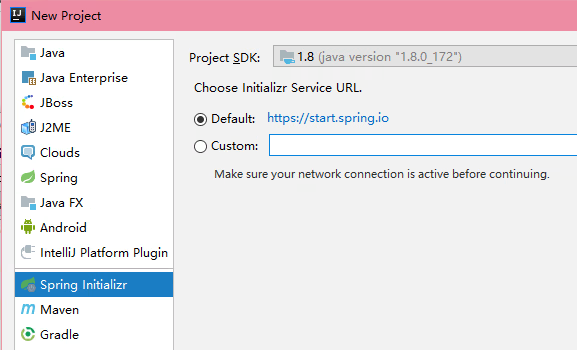
由于教程使用的SpringBoot的版本为1.3.5,比较老,而当前最老的SpringBoot的GA版本为1.5.20,已经默认不支持Velocity了,所以需要在pom.xml里手动添加Velocity的依赖:
<dependency>
    <groupId>org.springframework.boot</groupId>
    <artifactId>spring-boot-starter-velocity</artifactId>
</dependency>
最简单的服务器

Controller处理用户请求,Service封装业务逻辑,DAO封装数据库访问
Controller示例
@Controller
public class IndexController {
    @RequestMapping(path = {"/", "/index" })
    @ResponseBody
    public String index() {
        return "Hello NowCoder";
    }

    @RequestMapping(path = {"/profile/{groupId}/{userId}"})
    @ResponseBody
    public String profile(@PathVariable("groupId") String groupId,
                          @PathVariable("userId") int userId,
                          @RequestParam(value = "type", defaultValue = "1") int type,
                          @RequestParam(value = "key", defaultValue = "nowcoder") String key) {
        return String.format("GID{%s}, UID{%d}, TYPE{%d}, KEY{%s}", groupId, userId, type, key);
    }
}
@ResponseBody 不使用视图解析器,直接返回return的内容。
@RequestMapping 配置路由映射规则
- path/value 路由,可以指定多个路由,可以使用变量,格式:
{var} - method 指定接受请求的方法(RequestMethod.GET, RequestMethod.POST 等)
@CookieValue 解析从Cookie里来的值
@PathVariable 路径变量
@RequestParam 请求参数
例如,对于上面的profile的Controller,URL:http://localhost:8080/profile/11/22?type=2&key=aaa,groupId解析为11,userId解析为22,type解析为2,key解析为aaa
Model
为了能在模板中使用一些变量,可以使用Model,SpringBoot会自动将其实例化为BindingAwareModelMap对象。

除了用Model,用ModelMap也是可以的,甚至还可以用Map<String, Object>等,建议用Model。
例如:
@RequestMapping(value = {"/", "/index"})
public String index(Model model) {
    model.addAttribute("vos", getNews(0, 0, 10));
    return "home";
}
Controller直接返回String,指定视图名,SpringBoot会寻找合适的视图解析器进行渲染。 上面的例子里,往model里添加了vos,在模板中就可以使用这个变量了。
也可以返回ModelAndView(似乎是进行了forward):
@RequestMapping(path = {"/", "index"})
public ModelAndView index(Model model) {
    model.addAttribute("vos", getNews(0, 0, 10));
    ModelAndView modelAndView = new ModelAndView();
    modelAndView.addObject(model);
    modelAndView.setViewName("home");
    return modelAndView;
}
velocity模板引擎语法
注意:SpringBoot 1.5.x不支持velocity模板引擎!教程使用的是SpringBoot 1.3.5版本,切换到该版本后支持velocity模板引擎。
官网文档:http://velocity.apache.org/engine/2.1/user-guide.html
# 这是注释

#*
块注释
*#
使用变量:$!{value1}
for循环示例:
#foreach($color in $colors)
    Color $!{foreach.index}/$!{foreach.count}: $!{color}
#end
使用Bean:
User: $!{user.name}  ## -> getName()
User:$!{user.getName()}
#include只是单纯把文本粘过来#parse不仅粘过来,还解析变量
定义宏与使用宏:
#macro(render_color $color, $index)
    Color By Macro $index, $color
#end

#foreach($color in $colors)
    #render_color($color, $foreach.index)<br>
#end
设置变量:
#set($title = "nowcoder")
重要内置对象
Controller里还可以使用HttpServletRequest、HttpServletResponse、HttpSession对象:
public String request(HttpServletRequest request,
                      HttpServletResponse response,
                      HttpSession session) { ... }
HttpServletRequest常用方法:
request.getHeaderNames();
request.getMethod();
request.getPathInfo();
request.getQueryString();
request.getHeader("Content-Type");
在使用Spring MVC时,request.getPathInfo()一直返回null HttpServletResponse常用方法:
response.addCookie(new Cookie("key", "value"));
response.addHeader("Authorization", "token");
HttpSession常用方法:
session.setAttribute("msg", "Hello");
session.getAttribute("msg")
重定向与错误
重定向
301跳转:永久转移 HttpStatus.MOVED_PERMANENTLY
使用RedirectView实现:
@RequestMapping("/redirect/301")
public RedirectView redirect() {
    RedirectView red = new RedirectView("/", true);
    red.setStatusCode(HttpStatus.MOVED_PERMANENTLY);
    return red;
}
302跳转:临时转移 HttpStatus.FOUND
除了使用RedirectView,还可以使用redirect:视图
@RequestMapping("/redirect/302")
public String redirect() {
    return "redirect:/";
}
错误处理
跳转至错误页,只需抛出异常即可。
要处理异常,使用@ExceptionHandler注解,传入捕获的异常类,默认Exception.class
@ExceptionHandler(Exception.class)
@ResponseBody
public String handleException(Exception e) {
    return "error: " + e.getMessage();
}
@ResponseStatus 可以指定返回的状态码
IOC
控制反转、依赖注入
@Autowired注解或配置文件
// service.ToutiaoService
@Service
public class ToutiaoService {
    public String say() {
        return "This is from ToutiaoService";
    }
}
// 自动注入
@Autowired
private ToutiaoService toutiaoService;
// 可以直接使用
@RequestMapping(value = {"/", "/index"}, method = {RequestMethod.GET, RequestMethod.POST})
@ResponseBody
public String index(HttpSession session) {
    return "Hello NowCoder, " + session.getAttribute("msg") +
            "<br> Say: " + toutiaoService.say();
}
AOP
@Before、@After,execution表达式
面向切面,所有业务都要处理的业务。一般用于日志、权限管理
@Aspect
@Component
public class LogAspect {
    private static final Logger logger = LoggerFactory.getLogger(LogAspect.class);

    @Before("execution(* com.nowcoder.toutiao.controller.IndexController.*(..))")
    public void beforeMethod(JoinPoint joinPoint) {
        logger.info("before method: ");
    }

    @After("execution(* com.nowcoder.toutiao.controller.IndexController.*(..))")
    public void afterMethod(JoinPoint joinPoint) {
        logger.info("after method: ");
    }
}